QuietSpecs

We may earn a commission when you buy through links on this page. As an Amazon Associate we earn from qualifying purchases. How we compare products

Are Brother printers quiet? Lasers list 46 to 49 dB(A), inkjets 53.5 to 55

Written by
· 8 min read

Brother printer quiet mode

Two kinds of noise figure appear in Brother's user guides. Every current laser gets a sound pressure (LpAm) and a sound power (LWAc) for printing, Quiet Mode and standby, and every inkjet gets one approximate printing pressure.

Lowest among the lasers are the HL-L3300CDW and MFC-L3720CDW color models at 46 dB(A), and each color laser drops to 43 dB(A) in Quiet Mode, one below the mono lasers' 44. For a low cost mono laser, the $139.99 HL-L2405W sits at 48 dB(A).

The best inkjet figures are 53.5 dB(A) on the MFC-J5110DW page and 54.0 in the MFC-J4355DW guide.

On this page
  1. How we chose
  2. Our picks
  3. How to choose
  4. Comparison
  5. FAQs
  6. Bottom line
  7. Review history

A quick look at the quietest Brother printers

Every current Brother color laser drops to 43 dB(A) with Quiet Mode on, and every mono laser to 44. Those figures sit on the General Specifications pages of Brother's user guides, which carry far more than the product pages: sound pressure and sound power for printing, Quiet Mode and standby on each laser, and a single approximate printing figure on each inkjet.

Printing at full speed, the current US lasers list 46 to 49 dB(A) of sound pressure and the inkjets 53.5 to 55.0 dB(A).

Lasers and inkjets are kept apart below, and within the lasers, sound pressure and sound power are never mixed. Prices are Brother's list prices from brother-usa.com on November 7, 2026, and other makers' printers are compared in our quietest printers guide.

How we chose these Brother printers

Brother's home and small office lasers and inkjets came from the brother-usa.com product sitemap, and each model's page was opened on November 7, 2026 for its lifecycle status, list price and Machine Noise row. The Online User's Guide on support.brother.com then supplied the General Specifications noise rows for each family, four guide families for the lasers and two for the inkjets. Product pages stood in only where no guide existed. Brother's business lasers, the HL-L5000 series and up, are outside this page.

A pick also needed an in-stock Amazon listing carrying the exact model number. Lasers and inkjets are ranked separately, sound pressure and sound power never share a ranking, and no Brother printer was put under a meter for this page. For the room around the printer, see our home office explainer.

QuietSpecs' picks of the quietest Brother printers

Prices as of Nov 12. Product prices and availability are accurate as of the date/time indicated and are subject to change.

Lowest Brother laser figure

Brother HL-L3300CDW

Brother HL-L3300CDW
  • Noise: 46 dB(A) LpAm printing (maker)
  • Price: $429.99 at Amazon, checked Nov 12
  • Best for: A shared desk where color copies matter more than speed
  • Skip it if: You need a document feeder or fax, which the MFC-L3720CDW adds at the same 46 dB(A)

Brother's guide lists "HL-L3300CDW LpAm = 46 dB (A)" while printing and 43 in Quiet Mode, the lowest laser figures it prints, with sound power of 6.21 B(A) in mono and 6.10 in color.

It is a 19 ppm digital color printer that also copies and scans, with Wi-Fi and USB but no Ethernet, at $429.99 list.

The all in one at 46 dB(A)

Brother MFC-L3720CDW

Brother MFC-L3720CDW
  • Noise: 46 dB(A) LpAm printing (maker)
  • Price: $459.99 at Amazon, checked Nov 12
  • Best for: A home office that faxes or scans stacks and wants Brother's lowest laser figure
  • Skip it if: Two-sided originals are a weekly chore; the MFC-L3780CDW scans both sides at 48 dB(A)

Same figures as the HL-L3300CDW, "MFC-L3720CDW LpAm = 46 dB (A)" while printing, 43 in Quiet Mode and 6.21 B(A) of mono sound power, with a 50 sheet document feeder and fax added.

The list price is $459.99, $30 more, for the same 19 ppm and the same Wi-Fi and USB connections.

Lowest Quiet Mode sound power

Brother MFC-L3780CDW

Brother MFC-L3780CDW
  • Noise: 48 dB(A) LpAm printing (maker)
  • Price: $569.98 at Amazon, checked Nov 12
  • Best for: A busy small office that can leave Quiet Mode on for routine jobs
  • Skip it if: Most of what you hear is full speed printing, where the 46 dB(A) models are lower

Flat out, the MFC-L3780CDW is the loudest of its family, "LpAm = 48 dB (A)" and 6.62 B(A) in mono. Quiet Mode changes that: sound power falls to 5.79 B(A), tied with the MFC-L3765CDW for Brother's lowest Quiet Mode figure, and pressure to 43 dB(A).

It prints 31 ppm, scans both sides in one pass and has Gigabit Ethernet, for $569.99.

Softest standby fan

Brother HL-L3295CDW

Brother HL-L3295CDW
  • Noise: 48 dB(A) LpAm printing (maker)
  • Price: $429.99 at Amazon, checked Nov 12
  • Best for: A printer left switched on all day in the room where you work

Printing, the HL-L3295CDW reads "LpAm = 48 dB (A)", 43 in Quiet Mode and 6.50 B(A) of mono sound power. Its guide gives the standby fan only 2.62 B(A), though, the lowest fan-running figure for any Brother laser.

A 31 ppm single function printer with Gigabit Ethernet and an NFC card reader, at $429.99.

A $139.99 laser in the lowest mono group

Brother HL-L2405W

Brother HL-L2405W
  • Noise: 48 dB(A) LpAm printing (maker, ISO 7779)
  • Price: $139.99 at Amazon, checked Nov 12
  • Best for: Occasional black and white printing on a tight budget
  • Skip it if: Two-sided printing is routine, and the HL-L2460DW adds duplex at 49 dB(A)

This 30 ppm Wi-Fi printer belongs to the lowest mono laser group in Brother's guides: "LpAm = 48 dB (A)" and "LWAc = 6.56 B (A)" while printing, ISO 7779 named for both, and 44 dB(A) and 6.06 B(A) in Quiet Mode.

There is no automatic duplex at $139.99 list.

Mono fax model with the lower sound power

Brother MFC-L2820DW

Brother MFC-L2820DW
  • Noise: 49 dB(A) LpAm printing (maker, ISO 7779)
  • Price: $269.99 at Amazon, checked Nov 12
  • Best for: A black and white home office that still sends faxes
  • Skip it if: Printing is the only job, and the HL-L2405W does that at 48 dB(A) for $140 less

Printing reads "LpAm = 49 dB (A)" and 6.63 B(A), ISO 7779 for both, with 44 dB(A) and 6.12 B(A) in Quiet Mode.

That sound power is 0.15 B below the MFC-L2900DW, which shares the 49 dB(A), and the MFC-L2820DW still brings a 50 sheet ADF, fax and Ethernet for $279.99.

Lowest inkjet figure

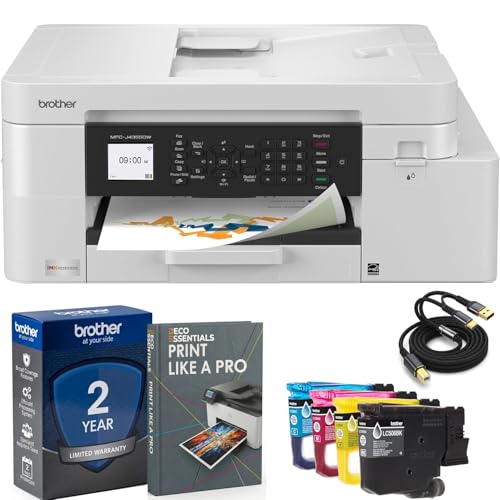
Brother MFC-J5110DW INKvestment

Brother MFC-J5110DW INKvestment
  • Noise: 53.5 dB(A) printing (maker page, basis not stated)
  • Price: $359.90 at Amazon, checked Nov 12
  • Best for: An inkjet office machine that scans a lot
  • Skip it if: Quiet comes first; every Brother laser lists 46 to 49 dB(A)

The product page shows "N/A / 53.5 dB(A)", tied with the MFC-J5010DW for the lowest printing figure on a current Brother inkjet. With no user guide posted yet, there is no copying, sound power or Quiet Mode figure.

It prints 28 ppm black, scans both sides and holds 600 sheets, at $359.99.

Lowest inkjet figure in a user guide

Brother MFC-J4355DW INKvestment

Brother MFC-J4355DW INKvestment
  • Noise: 54.0 dB(A) printing, approx. (maker)
  • Price: $274.99 at Amazon, checked Nov 12
  • Best for: Color printing and fax in a room you share with people
  • Skip it if: A second paper tray is on the list, which the MFC-J4555DW adds at the same 54.0

The MFC-J4355DW user guide lists "Printing 54.0 dB (A) (Approx.)" and 51.0 for copying from the glass, with the footnote "Noise depends on printing conditions." Quiet Mode is there as a setting, without a figure.

This INKvestment model prints 20 ppm black, faxes and carries a 2 year warranty, at $209.99 list.

Lowest priced Brother

Brother MFC-J1360DW Work Smart

Brother MFC-J1360DW Work Smart
  • Noise: 55.0 dB(A) printing, approx. (maker)
  • Price: $164.99 at Amazon, checked Nov 12
  • Best for: Light home printing where cost comes first
  • Skip it if: It would run every day in the room you work in

At $109.99 list, the Work Smart MFC-J1360DW is the cheapest current Brother here, and the loudest inkjet: its guide lists "Printing 55.0 dB (A) (Approx.)" and 53.0 for copying, the same as the MFC-J1365DW and MFC-J1410DW.

It has Quiet Mode, a 20 sheet ADF and automatic duplex, at 16 ppm black and 9 color.

How to choose

If one you own is already making a noise, start with How to make a printer quieter.

How loud is a Brother printer?

A laser lists 46 to 49 dB(A) while printing and an inkjet 53.5 to 55.0 dB(A), going by Brother's figures for the models it sold in the US on November 7, 2026.

The two sets come from different kinds of paperwork. Each laser guide gives "LpAm", A-weighted sound pressure, and "LWAc", sound power in bels, and names "the method described in ISO 7779". The inkjet guides give one "Sound Pressure" figure marked "(Approx.)", with the footnote "Noise depends on printing conditions." That makes the inkjet range a loose guide and the laser range a firmer one, though inside each group the figures rank cleanly. Expect the gap between the two to be real but not exact.

Which Brother laser printer is the quietest?

The HL-L3300CDW and MFC-L3720CDW, at "LpAm = 46 dB (A)" while printing, with the HL-L3220CDW also at 46. All three fall to 43 dB(A) in Quiet Mode. Sound power agrees. The HL-L3300CDW and MFC-L3720CDW are lowest there too, at 6.21 B(A) in mono and 6.10 in color, while the HL-L3220CDW prints 6.25 and 6.17.

One quirk in the footnotes. The mono guides attach the ISO 7779 note to both sound pressure and sound power, but the color guides attach it to sound power only, so the color dB(A) rows carry no standard at all. Setting color against mono on dB(A) is therefore Brother against Brother on an unstated basis.

Brother's mono lasers sit at 48 or 49 dB(A)

Two user guides cover them, one shared by the HL-L2460DW family and one by the MFC-L2900DW family. Printing ranges from 48 to 49 dB(A) and 6.50 to 6.78 B(A) of sound power, and Quiet Mode brings each to 44 dB(A).

PrintingSound powerModels
48 dB(A)6.56 B(A)HL-L2400D, HL-L2405W, HL-L2420DW
48 dB(A)6.50 B(A)HL-L2465DW, MFC-L2760DW
49 dB(A)6.63 B(A)DCP-L2640DW, HL-L2480DW, MFC-L2820DW
49 dB(A)6.65 B(A)HL-L2460DW, HL-L2865DW
49 dB(A)6.78 B(A)MFC-L2900DW

Quiet Mode sound power is 6.06 B(A) in the HL-L2460DW guide and 6.12 in the MFC-L2900DW guide. For standby, the first reads "Up to 30 dB (A)", a ceiling we leave unranked, and the second "30 dB(A)", with sound power given as "Inaudible".

No Brother price showed for the HL-L2420DW, HL-L2465DW, HL-L2865DW or MFC-L2760DW on November 7.

Color lasers run from 46 to 48 dB(A)

Brother calls these digital color printers. Printing sits at 46 to 48 dB(A), Quiet Mode at 43, and mono sound power from 6.21 to 6.62 B(A).

PrintingModelSound power, mono and color
46 dB(A)HL-L3220CDW6.25, 6.17
46 dB(A)HL-L3300CDW, MFC-L3720CDW6.21, 6.10
47 dB(A)HL-L3280CDW6.39, 6.47
47 dB(A)MFC-L3765CDW6.41, 6.51
48 dB(A)HL-L3295CDW6.50, 6.58
48 dB(A)MFC-L3780CDW6.62, 6.67

Quiet Mode reorders the sound power column a little: 5.79 B(A) mono on the MFC-L3765CDW and MFC-L3780CDW, 5.81 on the HL-L3300CDW and MFC-L3720CDW, 5.86 on the HL-L3220CDW, HL-L3280CDW and HL-L3295CDW.

In this family the fast models are the loud ones. The 31 ppm HL-L3295CDW and MFC-L3780CDW are the loud end at full speed, the 19 ppm HL-L3300CDW and MFC-L3720CDW the quiet end, and neither of the quiet pair has Ethernet.

How loud are Brother inkjet printers?

Between 53.5 and 55.0 dB(A) while printing. The lowest, 53.5 dB(A), is on the MFC-J5110DW and MFC-J5010DW product pages; the Work Smart MFC-J1360DW family carries the highest, 55.0.

PrintingModels
53.5 dB(A)MFC-J5010DW, MFC-J5110DW (product pages; no guide posted yet)
54.0 dB(A)MFC-J4355DW, MFC-J4555DW
54.5 dB(A)MFC-J6560DW, MFC-J6960DW
55.0 dB(A)MFC-J1355DW, MFC-J1360DW, MFC-J1365DW, MFC-J1367DW, MFC-J1410DW

Copying gets a second figure, measured "using the scanner glass": 51.0 dB(A) for the MFC-J4355DW pair and 53.0 for the J1360 family and the J6560 pair. Sound power, standby and Quiet Mode get none on any inkjet guide. Still listed as current, the MFC-J6940DW prints a single "50.0dB" under a "Ready Printing" header. Which state that describes is anyone's guess, so it stays unranked.

Quiet Mode trades speed for 3 to 5 dB(A)

The guides put it plainly: "The Quiet Mode setting can reduce printing noise. When Quiet Mode is turned on, the print speed becomes slower."

Only the lasers get a number. Each current color laser lists "Printing (Quiet Mode) LpAm = 43 dB (A)", 3 to 5 below its full speed figure, and each mono laser lists 44, 4 or 5 below. Sound power drops by 0.2 to 0.8 B. The inkjets have the setting and the same speed warning, but no figure. It ships switched off on all of them, and Eco Mode on the J1360 family turns it on along with a short sleep timer. For a printer in a bedroom or a shared office, that is the one setting worth changing on day one.

Where the Quiet Mode switch is

On most models it lives on the control panel under General Setup, then Ecology. Choose Quiet Mode, set it to On and press OK.

The 2.7 inch touchscreen inkjets, the MFC-J1410DW and MFC-J4555DW, take a longer path: Settings, All Settings, General Setup, Ecology, Quiet Mode. A small icon then shows on the home screen.

With no screen at all, the HL-L2400D needs a button routine. Close the front cover, wait for Ready, and press Go 11 times; "All LEDs blink twice when you turn on the Quiet Mode." The printer driver can switch the setting as well, and that is where Brother's troubleshooting pages send you when printing feels slow.

Why is my Brother printer making noise when it is not printing?

On a color laser, standby hum is usually the cooling fan. On an inkjet that wakes up by itself, it is print head cleaning. The user guides describe both.

Standby on the color laser guides reads "Default: Inaudible", with a footnote: "If fan motor is functioning: LpAm = 40 dB (A)". In sound power the fan adds 2.62 B(A) on the HL-L3295CDW, 3.17 on the MFC-L3780CDW and 4.81 on the HL-L3280CDW.

Inkjets "will automatically turn itself on periodically for print head maintenance, and then turn itself off", even when powered off. Before you unplug one to move it, the guide asks you to wait until "all mechanical noises have stopped", so the head can park.

Reading the B(A) sound power column

A figure such as "LWAc = 6.56 B (A)" is sound power in bels, the total noise the printer gives off; 6.56 B equals 65.6 dB. It does not line up with the dB(A) sound pressure figure, which describes what reaches a listener.

For comparing two printers, sound power is the steadier number because it describes the machine rather than one listening spot, and since Brother names no distance for its sound pressure rows, the B(A) column is where the lasers line up most reliably. Brother labels the quantity LWAc and never defines the suffix. This explainer on power versus pressure covers how the two quantities differ.

Why does the Brother website say 30dB / 49dB?

That "Machine Noise" row repeats the user guide's standby and printing sound pressure, minus the labels. The HL-L2460DW page reads "30dB / 49dB", and its guide gives "LpAm = 49 dB (A)" printing and "Up to 30 dB (A)" ready.

Color lasers show 40 dB as the first number, matching the guide's standby figure with the fan running rather than its default "Inaudible". The new inkjets read "N/A / 55.0dB" or similar, which is the guide's printing figure.

No product page shows Quiet Mode or sound power; for those, open the guide.

Discontinued inkjets and models with no figure

On November 7, 2026, Brother's US site marked eleven inkjets "Discontinued": the MFC-J1010DW, MFC-J1170DW, MFC-J1205W, MFC-J1215W, MFC-J4335DW, MFC-J4535DW, MFC-J5340DW, MFC-J5855DW, MFC-J6540DW, MFC-J6555DW and MFC-J6955DW. Their guides run from 50.0 dB(A) on the MFC-J6555DW to 57.0 on the MFC-J4335DW and MFC-J4535DW, with the MFC-J1205W and MFC-J1215W at 56. A store still selling one is clearing old stock.

Two current models are gaps. The MFC-J1800DW page has no Machine Noise row and we found no guide for it, and the MFC-J6940DW figure is unlabelled. Every current laser we opened had a figure.

How the quietest Brother printers compare

ProductNoiseQuiet ModeTypeSpeedBrother price, Nov 7Price
Brother HL-L3300CDW46 dB(A) LpAm printing (maker)43 dB(A); 5.81 B(A) mono, 5.89 colorDigital color laser class, print, copy, scan19 ppm black and color$429.99 list$429.99
Brother MFC-L3720CDW46 dB(A) LpAm printing (maker)43 dB(A); 5.81 B(A) mono, 5.89 colorDigital color laser class all in one, fax19 ppm black and color$459.99 list$459.99
Brother MFC-L3780CDW48 dB(A) LpAm printing (maker)43 dB(A); 5.79 B(A) mono, 5.86 colorDigital color laser class all in one, fax31 ppm black and color$569.99 list$569.98
Brother HL-L3295CDW48 dB(A) LpAm printing (maker)43 dB(A); 5.86 B(A) mono, 5.87 colorDigital color laser class, print only31 ppm black and color$429.99 list$429.99
Brother HL-L2405W48 dB(A) LpAm printing (maker, ISO 7779)44 dB(A), 6.06 B(A)Mono laser, print only30 ppm$139.99 list$139.99
Brother MFC-L2820DW49 dB(A) LpAm printing (maker, ISO 7779)44 dB(A), 6.12 B(A)Monochrome laser all in one with faxUp to 34 ppm$279.99 list$269.99
Brother MFC-J5110DW53.5 dB(A) printing (maker page, basis not stated)No figure yetINKvestment inkjet all in one, fax28 ppm black, 26 color$359.99 list$359.90
Brother MFC-J4355DW54.0 dB(A) printing, approx. (maker)Setting only, no figureINKvestment inkjet all in one, fax20 ppm black, 19 color$209.99 list$274.99
Brother MFC-J1360DW55.0 dB(A) printing, approx. (maker)Setting only, no figureInkjet all in one16 ppm black, 9 color$109.99 list$164.99

Prices as of Nov 12. Product prices and availability are accurate as of the date/time indicated and are subject to change.

Frequently asked questions

How do I turn on Quiet Mode on a Brother printer?

On Brother lasers and inkjets with a small LCD, go to General Setup, then Ecology, then Quiet Mode, and choose On. Touchscreen models such as the MFC-J4555DW use Settings, All Settings, General Setup, Ecology, Quiet Mode. On the HL-L2400D, which has no screen, press Go 11 times with the machine ready; all LEDs blink twice when it turns on.

Does Quiet Mode slow a Brother printer down?

Yes. The guides say "When Quiet Mode is turned on, the print speed becomes slower", and the troubleshooting pages tell you to switch it off if printing is too slow. How many pages a minute you lose is never stated.

How many decibels is a Brother laser printer?

Between 46 and 49 dB(A) of sound pressure while printing, according to the user guides for current US models, and 43 or 44 dB(A) in Quiet Mode. Mono lasers list 30 dB(A) or "Up to 30" in standby; color lasers call standby inaudible unless the fan runs, when it is 40 dB(A).

Why does my Brother inkjet make noise when it is turned off?

It is cleaning its print head. The inkjet specifications say the machine "will automatically turn itself on periodically for print head maintenance, and then turn itself off" even when switched off. Before unplugging one, wait until "all mechanical noises have stopped".

The bottom line

Brother's product pages print a bare "49dB" with no label. Go one click further, to the user guide, and the picture flips. Each laser's General Specifications page splits sound pressure from sound power, gives Quiet Mode a separate row, and even says what the cooling fan adds in standby. On a $140 printer.

The inkjets get one approximate number each. No sound power, no Quiet Mode figure, though every one has the setting.

My pick for a shared room: a color laser like the HL-L3300CDW with Quiet Mode left on. Pages come out slower, as Brother warns. I would take that trade.

Stanley Alu, founder and editor

What we also considered

These are worth knowing about, and why they didn't make the list.

  • Brother HL-L2460DW

    The HL-L2405W plus automatic duplex and Ethernet, for $179.99, at "LpAm = 49 dB (A)" and 6.65 B(A) printing; Quiet Mode matches the rest of its guide family at 44 dB(A) and 6.06 B(A).

    See it at Amazon
  • Brother DCP-L2640DW

    Copies and scans without fax for $209.99, with the MFC-L2820DW's 49 dB(A), 6.63 B(A) and 44 dB(A) Quiet Mode.

    See it at Amazon
  • Brother HL-L3280CDW

    At 47 dB(A) and 6.39 B(A) mono it falls between the HL-L3300CDW and the HL-L3295CDW, for $344.99, but on November 7 its Amazon listing showed only a future availability date.

    Search Amazon for this model
  • Brother MFC-J6560DW INKvestment

    An 11 x 17 INKvestment model at 54.5 dB(A) printing and 53.0 copying for $309.99. No Amazon listing we found carried its model number.

    Search Amazon for this model

How we reviewed this article

Every statement here comes from the 24 maker documents, standards and agency pages listed under Sources, quoted where the wording matters. We did not measure, inspect or repair anything ourselves. Each substantive revision is dated below. How we work

  1. Current version

    First published, written by Stanley Alu.

Sources

All 24 sources
Manufacturer pages and manuals for every product

Related guides